Welcome to the Catchpoint Portal! This interface makes it easy to set up and run Web Page Tests instantly, or on a scheduled basis. You can also use it to view historical test results, analyze your data, respond to alerts, and troubleshoot any issues.
You can familiarize yourself with the Catchpoint Portal by watching this video:
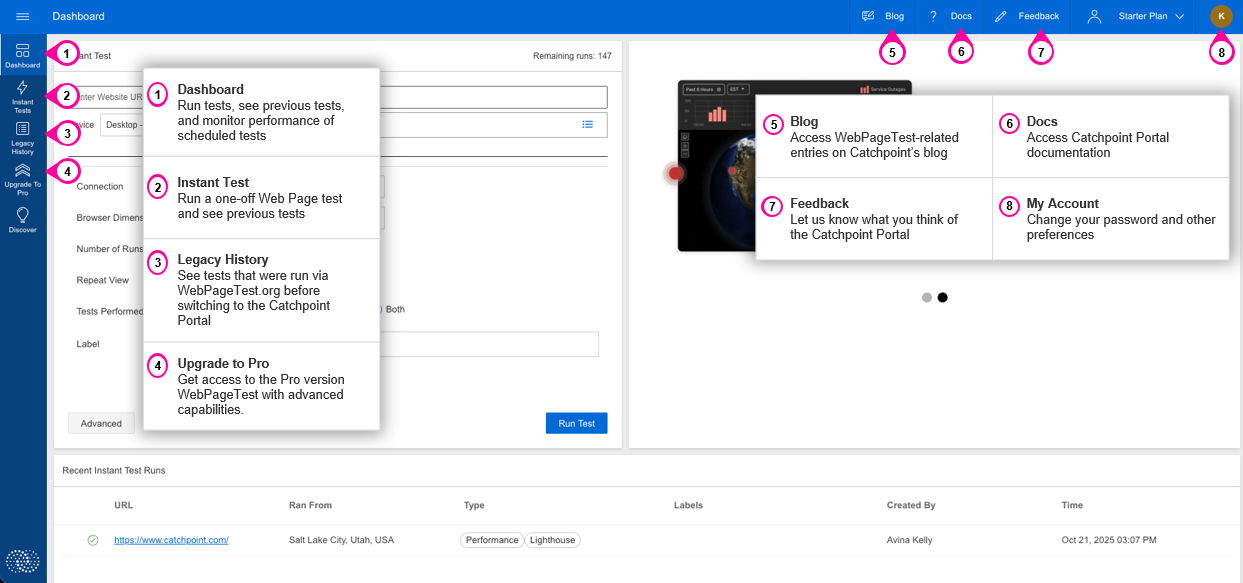
1. Dashboard
Access the Dashboard to run tests, see results of previous tests, and monitor the performance of your scheduled tests.
2. Instant Test
Go to Instant Tests when you want to run a one-off test of a web page immediately, or to see the results of previous instant tests.
3. Legacy History
The Legacy History section shows the results of tests that were run on WebPageTest.org, prior to switching to the Catchpoint Portal.
4. Upgrade to Pro
Click this to upgrade to WebPageTest Pro and get access to advanced analytics, alerts, and more.
5. Blog
This link takes you to Catchpoint's blog, filtered to display WebPageTest related entries.
6. Docs
Click Docs to access Catchpoint's WebPageTest documentation.
7. Feedback
Use the feedback link to let us know what you think of the Catchpoint portal and to give us any ideas you have for improvement.
8. My Account
This link lets you access your account preferences and change your password.